
Recurring Billing Software
Recurring billing software is a system of various billing functions and automated internal processes to execute orders, generate invoices, send them to customers, collect payments and perform payment reconciliation at regular intervals.
Earlier, recurring billing processes didn't work well in automating the billing process. Unlike traditional billing, a recurring billing system offers various online subscription services like Business Magazine, Trade Magazine, and NewsPoint. In this process model, the owner is supposed to charge customers monthly depending on the subscription period, such as weekly, monthly, quarterly, semiannually, and annual. Once the subscription processes have been created, the entire process, which includes generating invoices with accurate charges, sending them to customers and collecting the funds automatically.
How does it work?
The process starts with generating an invoice when a customer purchases a recurring subscription, as shown in the diagram. Next, the invoice is sent to the customer via the chosen channel (email, web portal, etc.). Upon receiving the invoice, customers can complete the payment using one of the available payment methods. If payment is successful, the subscription continues, and the system repeats the same process every month (as per defined intervals) to charge the next period until the customer cancels the subscription. Besides all these, the system takes care of identifying/verifying customers at different stages during the process.
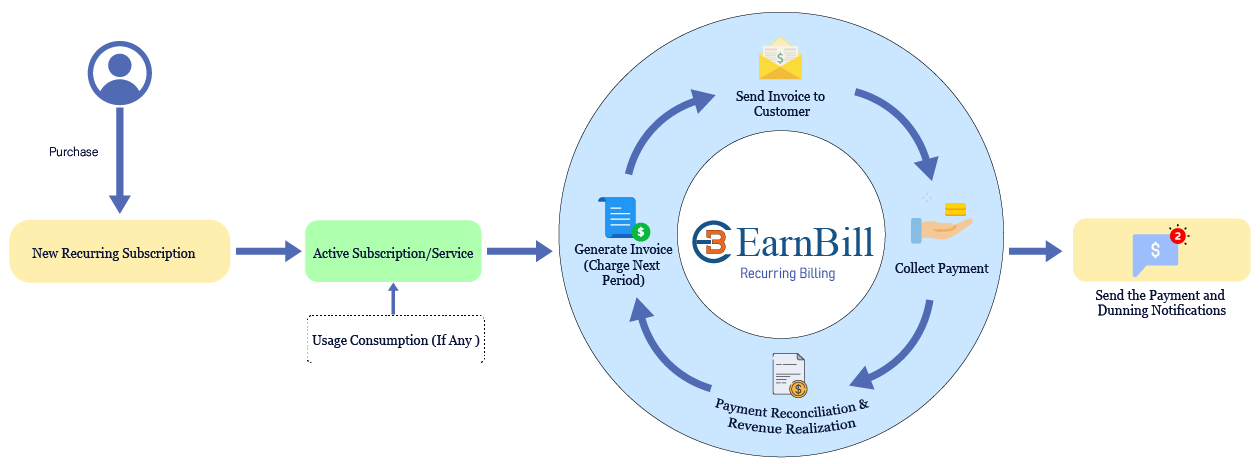
Further, in a typical subscription-based model, businesses expect a few other functionalities from a recurring billing solution, like a free trial, promotional discount offer, and flexible plan. However, if a business has to offer a complete promotional discount, such as during a promotion plan for a certain period before collecting payments and activating recurring subscriptions. The first trial subscription becomes active upon successful payment – in this case, the service continues and renews every month until the customer cancels the subscription. During the trial period, before the last date of the promotional subscription plan, businesses can also dramatically increase trial-to-paid conversion by automating the billing process and the same can be activated upon subscription upon successful payment.
The EarnBill recurring billing software allows the above business problem by offering a whole set of features/functionalities with the flexibility of customization to handle any specific requirement at any stage. Additionally, the EarnBill automates the end-to-end business workflow and eliminates manual intervention, which further helps businesses simplify processes seamlessly and efficiently. By automating the billing process, companies can save administrative time, reduce errors, and improve customer satisfaction.
How can EarnBill help your business?
With EarnBill, you get a set of flexibility to customize the capabilities of the billing process as per your business requirements and customer preferences. In addition to the core billing functions, EarnBill offers many out-of-the-box capabilities listed below:
Billing Cycles
The EarnBill offers multiple lengths of billing cycles like daily, weekly, monthly, quarterly, and annually to meet various business requirements. Furthermore, the billing cycle length is allowed to be flexible to change, and when it changes, the system takes care of prorating the invoice according to the current billing cycle length until a customer initiates an upgrade or cancels the account. Optionally, for business-critical requirements, if a particular customer does not fit into standard billing cycles, EarnBill can be set to invoice every month, and a child customer can be a parent customer.
Generate Revenue Report
This feature enables you to generate a precise billing report before the individual invoices for any particular billing cycle is an optional feature. The purpose is to validate the uninvoiced invoices, rectify mistakes or inaccuracies and make any corrections needed in the respective subscription orders before producing actual invoice by reviewing the generated invoices. The revenue report will need to be approved or disapproved. This prevents/reduces the risk of errors which are generated for this given billing cycle. The revenue billing report can be approved or disapproved.
Auto Proration
EarnBill's prorated billing feature helps you apply proration automatically in recurring billing to ensure customers are charged as expected and generates accurate invoices accordingly. For example, a customer starts or changes their plan in the middle of the billing cycle, and the next bill charged to their account only includes the partial amount calculated by dividing the total monthly charge by the total number of days per month. Proration can be set for the entire account, and the owner can set for an individual plan to upgrade or cancel the plan in the day of the subscription.
Apply Over Payments to Invoices
EarnBill's recurring billing software offers you a feature to apply payments to unpaid invoices automatically. For instance, if a customer makes an over-payment against a specific invoice, that payment goes to this account as a balance on credit notes to invoices when generated automatically before collecting automatic payments. Suppose a customer has an unpaid invoice of $50 and made an overpayment. In that case, EarnBill's automatic payments processor adds $44 only from the customer's account after applying the credit balance.
Apply Credit Note on Invoices Before Payments
With this feature in recurring billing software, businesses can apply the available balance on credit notes to invoices when generated automatically, before collecting automatic payments. Suppose a customer has an unpaid invoice of $50 and the customer has a credit balance of $6 available in the customer's account. In that case, EarnBill's automatic payments processor adds $44 only from the customer's account after applying the credit balance.
Automatic Payment Processing
Businesses can use this feature to set up automatic payment collection (EarnBill's secure payment handling for initiating funds from customer accounts) based on the billing cycle. The processor sends this payment request with flexibility to configure the payment attempts to match business preferences. This collection job initiates the fund collection automatically based on payment method previously used by customers. Customers never receive invoices as the system collects payments from their accounts periodically in a secure manner. This helps the company improve its day-to-day operations and avoid the hassles of sending and collecting payments and waiting for responses. Additionally, it makes it easy for customers to pay for their purchases.
Automatic Invoice Notification
EarnBill's Notification feature allows you to customize messages and send invoice PDF's automatically to the customer via email. This automation helps save the company time and ensure that customers receive invoices on time. Additionally, it enhances customers' awareness to make all payments on time and avoid when needed.
Benefits of EarnBill's Recurring Billing Software
Revenue Realization
The EarnBill automatic collection process helps companies in many ways like sending payment reminders, payment collection (fund debit) and increasing efforts to reduce unreconciled payments. This facilitates the customer to resolve pending issues by seamlessly recovering failed payments using the EarnBill configuration very convenient. It ensures minimal deviation to your cash flow.
Better Data Insights
The EarnBill automated billing provides various administrative reports which help businesses gain better insights into their billing data. For instance, the EarnBill System generates reports about upcoming subscription renewals, payment plans, or customers may need to reconnect invoices. It becomes useful to identify areas for improvement. As you issue early and make better business decisions.
Efficiency & Accuracy
Efficiency and accuracy are the most important quality factors of a software product. EarnBill helps businesses save time and money by automating many manual tasks involved in the billing process, such as creating invoices, sending payment reminders, invoicing, collecting payments, and reconciling transactions. This automation can help focus on other tasks such as core business activities, productivity, customer service or sales. Not only this, the EarnBill provides an option utilize flexible payment options that are most suitable for the company's payment terms and ensure the transactions are recorded accurately in the module.
Enhanced Customer Satisfaction
Customer satisfaction is a crucial factor for business growth. Keeping this in mind, the EarnBill streamlines and automates billing frameworks to several ways like providing accurate invoices and sending out email notifications/alerts for future subscriptions, invoices & payments online via the EarnBill (or self-service) portal, where they can make secure payments. This transparency and customer services, or create awareness about their subscriptions from a single view (like subscription, invoice & payments using the EarnBill (or self-service) portal.
Scalability and Growth
Scalability is an essential component of any software system. Thus, the EarnBill Recurring Billing Software focuses on horizontal scalability and supports growing amounts of data. That means as your business grows, EarnBill effortlessly scales to accommodate increasing customers and transactions. Whether you're a startup or enterprise with millions of customers, EarnBill adapts to your business as it grows and ensure a seamless experience for you and your customers.
Choose EarnBill for your rating needs and use its powerful features to streamline recurring billing software operations.
Ready to automate your recurring billing?
Start streamlining your billing processes today with EarnBill's powerful recurring billing software. Reduce manual work, improve accuracy, and enhance customer satisfaction.
Get Started with EarnBill