
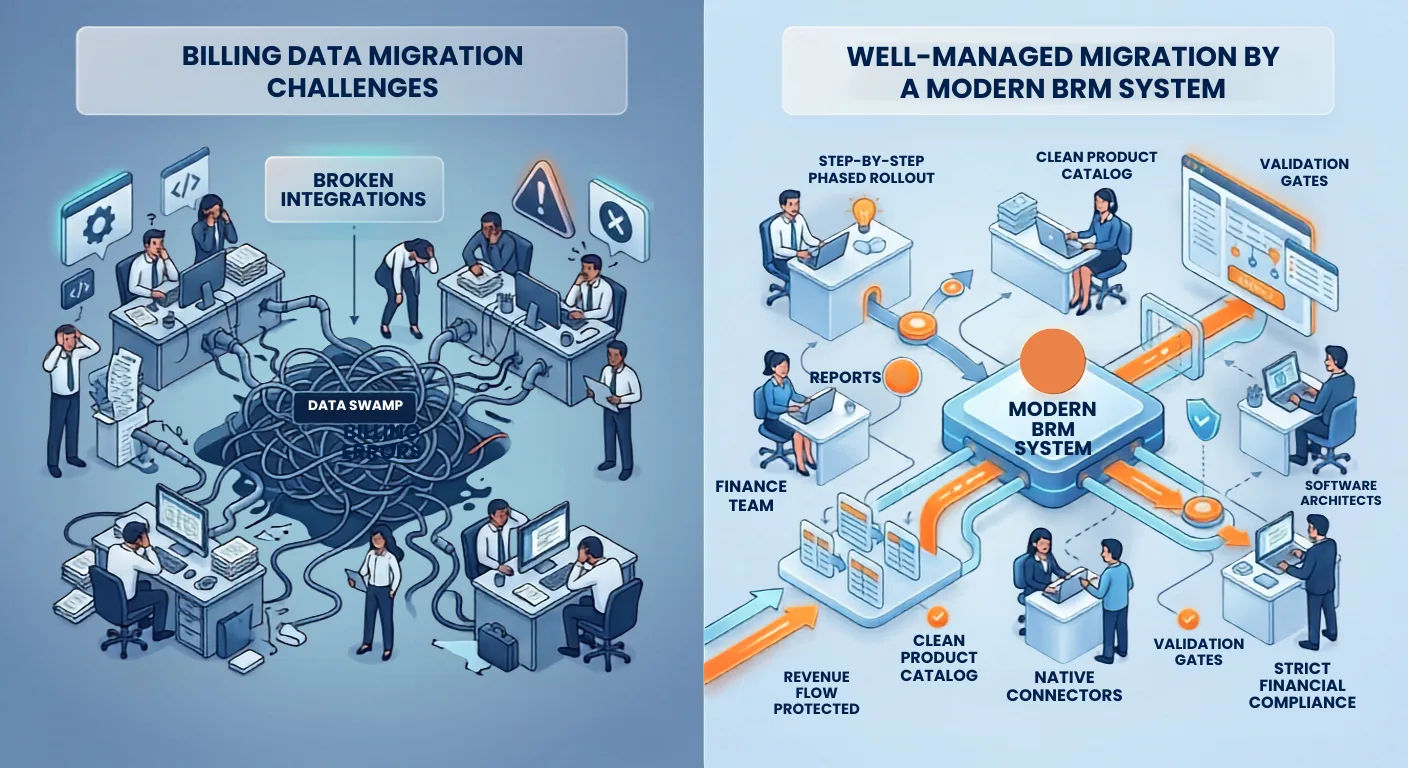
For any fast-growing enterprise, there comes a time when the legacy billing system begins to feel like a bottleneck. Whether you are handling complex multi-tier enterprise SaaS agreements, managing thousands of dynamic seats in a Unified Communications (UCaaS) environment, or processing terabytes of usage data from satellite internet terminals, your billing engine is the heart of your revenue operations.
When your current system can no longer support new pricing models, hybrid bundles, or real-time usage rating, the decision to migrate becomes inevitable.
To the executive team, a legacy billing migration sounds like a straightforward IT project: export data from the old system, map it to the new one, run a few tests, and flip the switch.
But talk to any CTO or CFO who has experienced one, and they will tell you a different story.
Unplanned downtime, missing historical data, broken CRM integrations, and billing errors can quietly drain hundreds of thousands of dollars. If your migration isn't managed carefully, the hidden operational and financial costs can quickly eclipse the cost of the software itself.
This guide breaks down the true, often invisible costs of migrating a billing and revenue management system (a.k.a. BRM system) and shares a practical framework to de-risk the transition for your business.
1. The Data Swamp (The True Cost of Clean-Up)
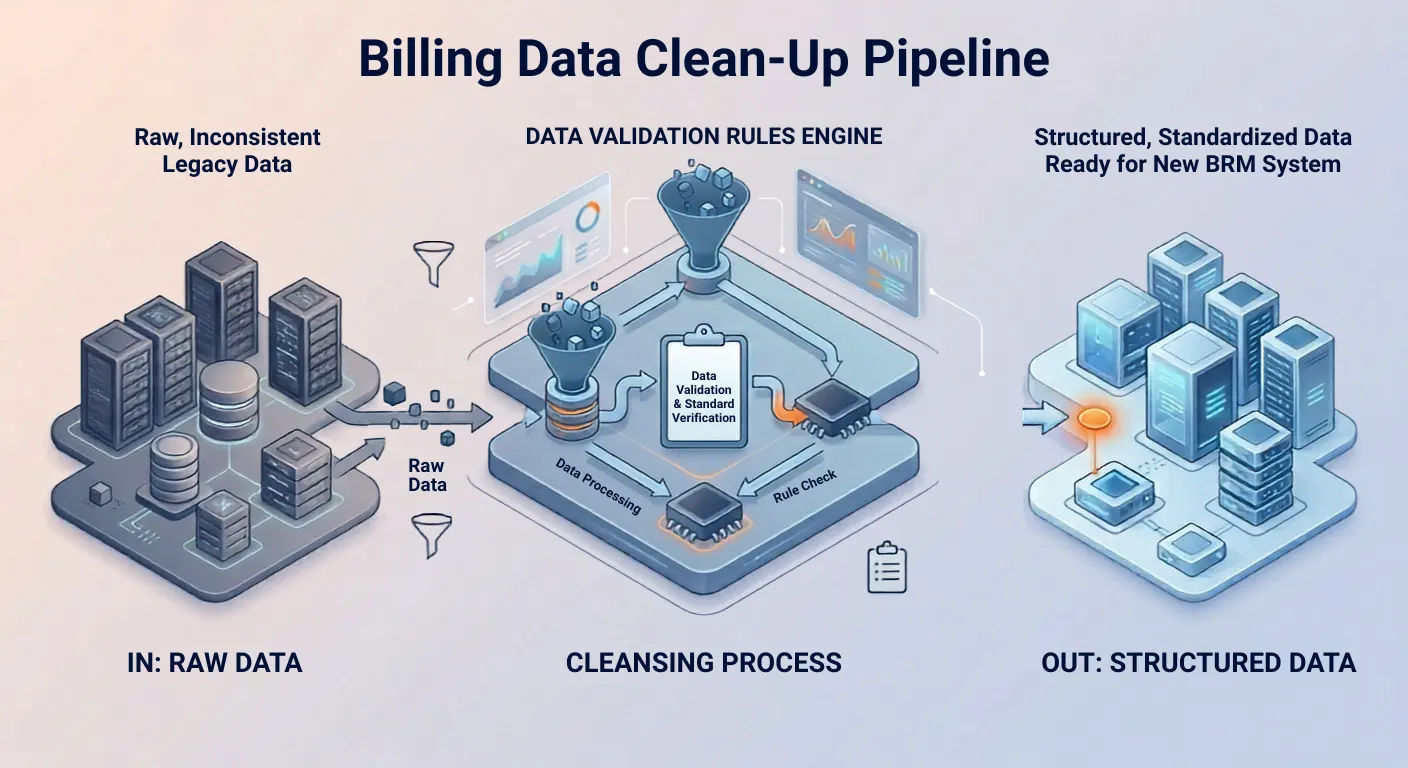
The biggest misconception in any billing data migration is that your legacy data is clean. Over years of operation, systems accumulate data debt. This includes expired discount codes that are somehow still active, manually overridden enterprise contracts, missing account fields, and inconsistent formatting for customer names or addresses.
When you try to feed this inconsistent data into a modern, strict BRM system, the new system will rightfully reject it.
The Functional Problem
If your legacy system allowed loose data entry (for instance, letting an agent bypass a mandatory tax field to close a deal quickly), a modern billing platform will stall. Your engineering and finance teams will end up spending hundreds of hours manually reviewing, cleaning, and rewriting thousands of database rows.
Your highly paid software architects start working on data reconciliation problems. The project timeline slips by weeks or months while engineering tries to figure out why 15% of your customer profiles cannot be imported.
2. The Custom Code Spaghetti and the API Trap
Legacy billing platforms rarely live in isolation. Over time, they become deeply intertwined with your entire operational infrastructure. Your old system is likely connected to your CRM (like Salesforce), your provisioning tools, your ERP (like NetSuite), and your customer support portals via custom-built scripts and API integrations.
[CRM / Salesforce] <---> [Custom Code / Scripts] <---> [Legacy Billing Engine]
|
[ERP / Accounting] <---> [Manual Spreadsheets] <---> [Network Provisioning]
When you pull out the legacy billing engine, these connections break.
The Technical Reality
A lot of companies assume that because the new billing platform has an open API, connecting it to existing systems will be simple. However, the logic used by your old billing system to communicate with your provisioning platform might not match how modern platforms work.
For instance, adding a new phone line must trigger an immediate provisioning event on the network and a pro-rated charge on the bill. If the new system handles pro-rations differently than the legacy system, the custom code connecting your CRM to your network provisioning will break down.
The Solution
Instead of trying to rebuild identical legacy connections, look for a modern platform that features built-in billing mediation and native connectors. The goal is to move away from hard-coded scripts and transition to an API-first framework that naturally understands subscription lifecycles, usage tracking, and automated service activation.
3. Revenue Leakage During the Dual-Run Phase
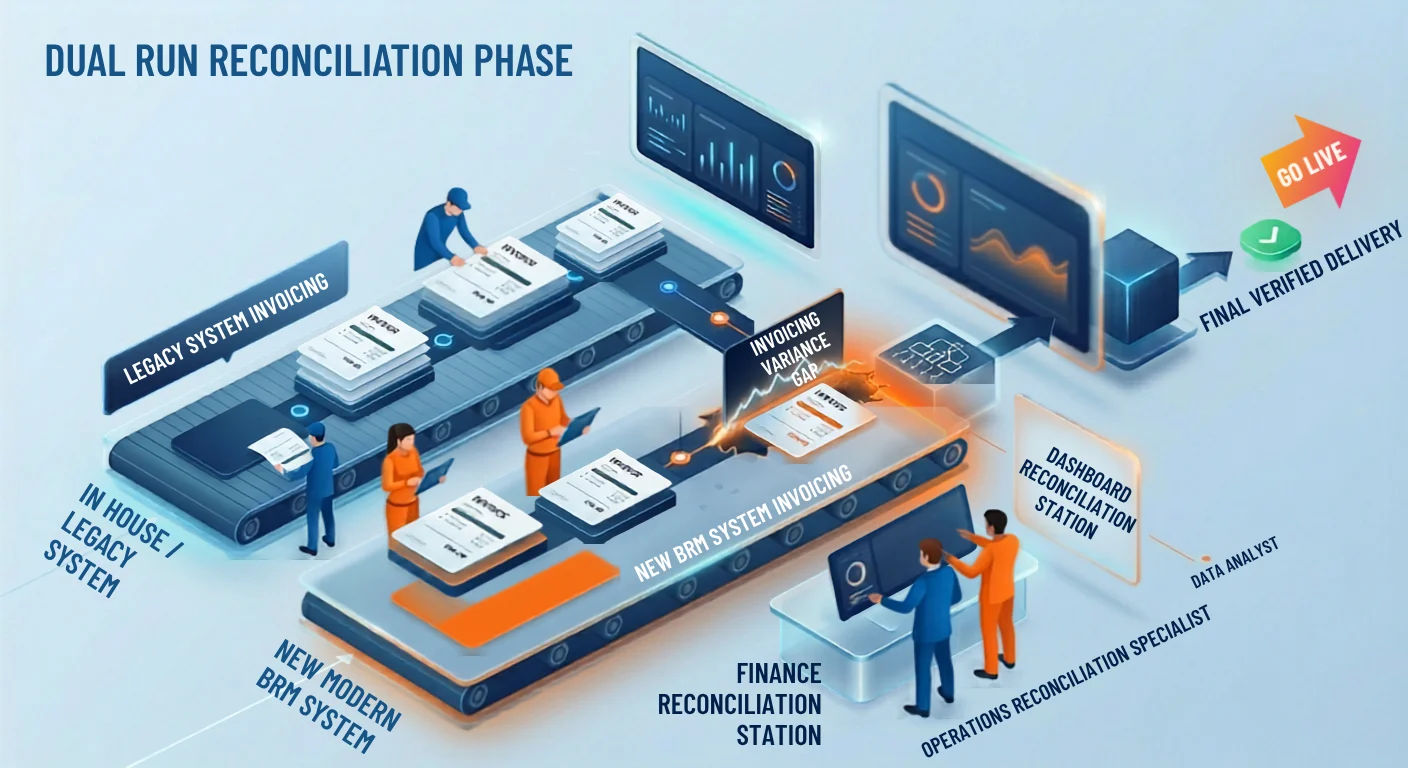
You cannot simply turn off your old billing platform on a Sunday night and launch the new one on Monday morning. To ensure accuracy, most enterprises run both the legacy system and the new revenue management system in parallel for at least one billing cycle. This is known as the dual-run or parallel run phase.
While running two systems mitigates the risk of total failure, it introduces a massive operational burden and a high risk of revenue leakage.
| Operational Challenge | Legacy System | New BRM System | Financial Impact |
|---|---|---|---|
| Usage Processing | Rates data using old rules | Rates data using new, optimized rules | Small rounding discrepancies add up across millions of transactions. |
| Manual Adjustments | Applied manually by support staff | Must be manually duplicated in the new system | High risk of human error; missed credits or double bills. |
| Reconciliation Time | Fast but often inaccurate | Strict and audited | Finance teams spend days tracking down why Invoice #1024 differs by $4.50 between systems. |
4. Post-Migration Churn and Broken Customer Experiences
The ultimate hidden cost of a poorly executed migration is paid in customer churn. If the transition goes wrong, your customers are the first to feel it.
- Incorrect Invoices: Customers receive bills with missing discounts, incorrect seat counts, or double charges for add-ons.
- Broken Portals: The customer self-service portal suddenly stops showing historical usage data or rejects saved credit cards.
- Dunning Disasters: Automated payment reminder emails are accidentally sent to customers who have already paid, creating unnecessary panic and frustration.
For an Enterprise SaaS company, trust is hard to build but incredibly easy to lose. If an enterprise client receives an inaccurate invoice that requires them to spend hours working with your account managers to fix, their faith in your operational capability drops.
A billing system migration should never become a customer service problem. If your customer support team is suddenly flooded with billing queries, your operational costs will skyrocket, and your customer satisfaction metrics will plummet.
5. A Practical Strategy to De-Risk Your Migration
You can avoid these hidden costs. Successful billing migrations rely on clear rules, automated validation, and a phased rollout approach. Here is how to protect your revenue and your team during a transition:
Step 1: Audit and Prune Before You Move
Do not migrate dead data. If an account has been closed for three years, archive it in a data warehouse; do not import it into your live BRM system. If you have 500 different legacy pricing plans that have changed over the years, use the migration as an opportunity to simplify your product catalog down to 20 or 30 standardized plans.
Step 2: Leverage Automated Mediation Engine Capabilities
For businesses reliant on heavy usage data such as satellite internet or UCaaS, ensure your new platform includes a robust, built-in billing mediation engine. A mediation engine can ingest raw usage records (CDRs), deduplicate them, normalize formats, and check them against active subscriptions automatically before sending them to the rating engine. This minimizes the need for custom coding and manual data cleaning.
Step 3: Run a Phased Migration
Instead of moving your entire customer base at once, migrate them in logical groups:
└──> [Phase 2: Simple Standard Subscriptions]
└──> [Phase 3: High-Volume Usage Accounts]
└──> [Phase 4: Complex Custom Enterprise Contracts]
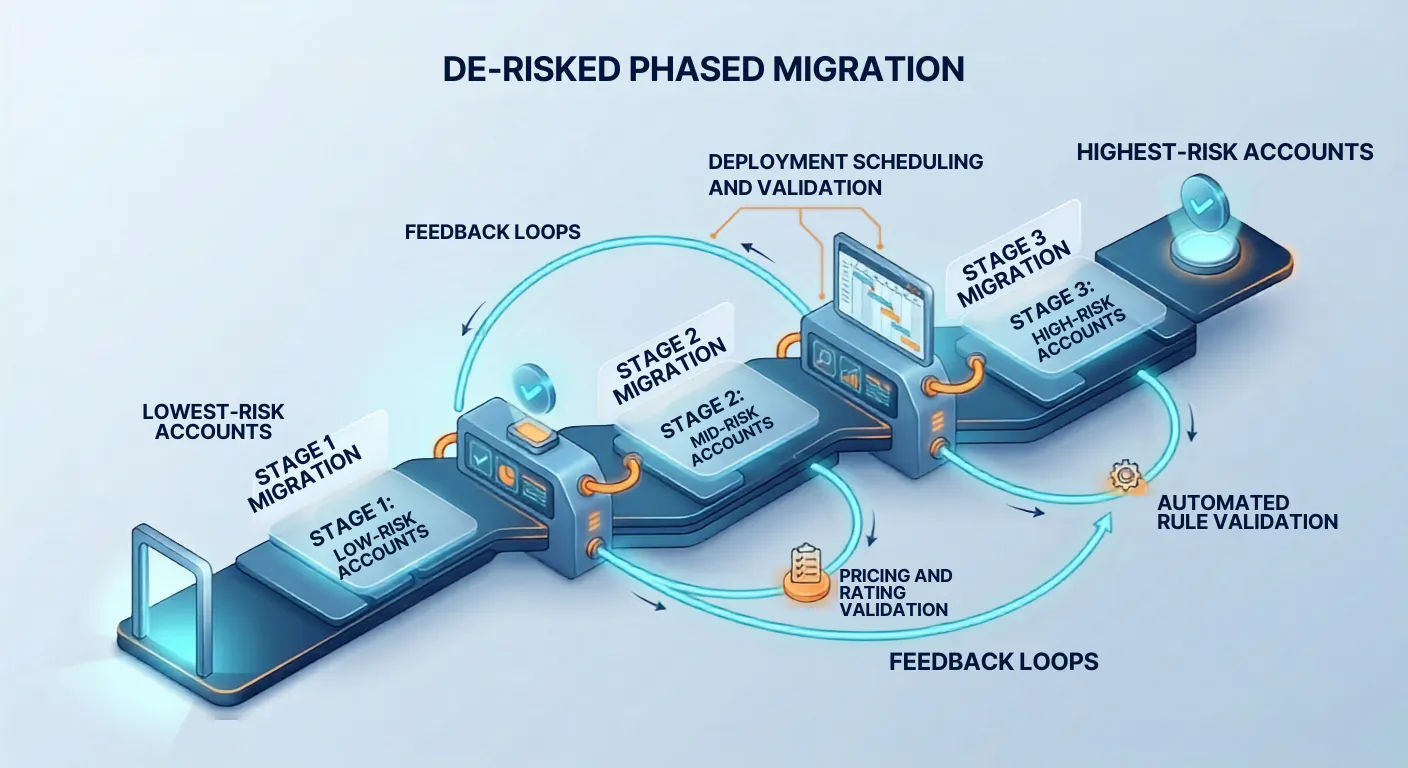
This phased approach allows you to catch and fix edge case bugs while keeping the vast majority of your revenue safe and operational.
Making the Transition Predictable
Every legacy billing migration comes with challenges, but it does not have to be a high-risk gamble. The secret lies in moving away from fragile, home grown tools and choosing an enterprise-grade or a telco-grade billing platform built to handle complexity out of the box.
A modern platform like EarnBill takes the anxiety out of revenue operations. With native support for complex subscription models, real-time usage-based rating, automated billing mediation, and strict financial compliance, EarnBill is designed to streamline your operations. It acts as a single source of truth that connects smoothly with your existing CRM, network infrastructure, and ERP workflows.
By prioritizing deep data validation, simplifying your product catalog, and choosing a billing engine built for scalability, your business can avoid hidden migration costs, protect its revenue, and set up a strong foundation for long-term growth.
De-Risk Your Billing Migration
See how EarnBill's telco-grade platform with built-in mediation, native connectors, and strict financial compliance makes billing migrations predictable and safe.